
A Guide to Choosing Colours for Your Business Website

How to Choose a Colour Scheme for a Business Website
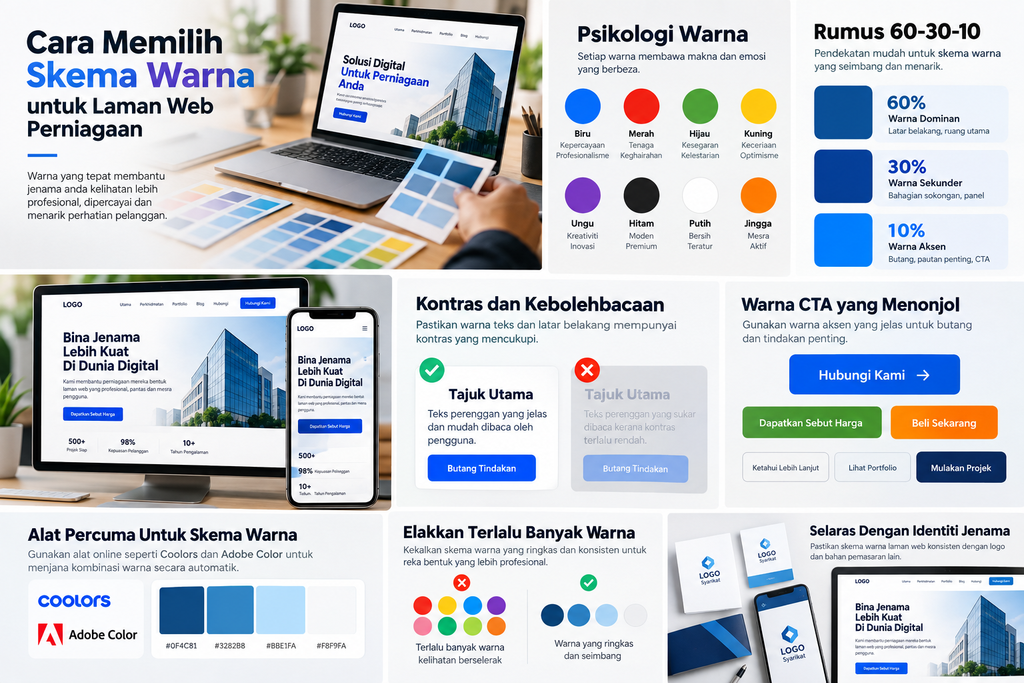
Colour does more than decorate a website. It shapes first impressions, communicates brand personality and helps people understand the information hierarchy on a page.
Within the first few seconds, a colour combination can make a business feel professional, modern, exclusive or welcoming, or create the opposite impression.
Choose your website colours for more than the owner’s personal preferences. Consider brand identity, target users, readability and the function of each website element.
1. Understand Colour Psychology
Colours can create different perceptions depending on context, industry, culture and how they combine with other visual elements.
For example:
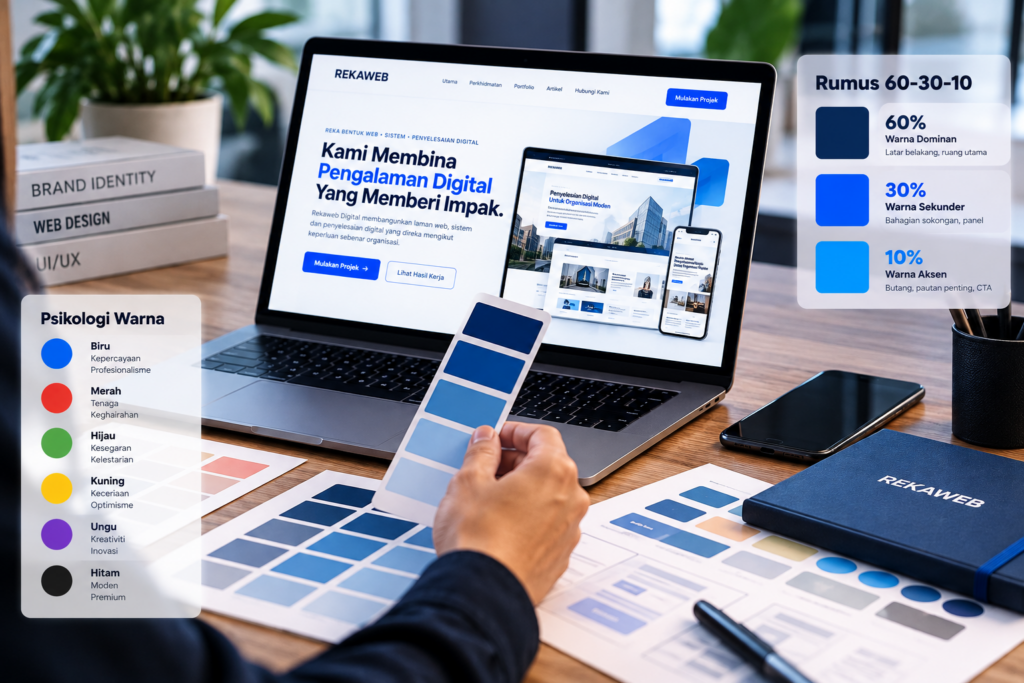
- Blue is often used to suggest professionalism, stability and trust.
- Red has a stronger character and is often used to attract attention.
- Green is frequently associated with nature, freshness and sustainability.
- Black can create a modern, premium and elegant appearance.
- White provides clean visual space and helps content feel organised.
- Yellow and orange can convey a cheerful, energetic and friendly atmosphere.
Colour psychology is not an absolute formula. Blue does not automatically make a brand trustworthy, just as black does not necessarily make a website look premium.
Overall design, typography, photography, content and user experience remain equally important.
2. Start with Your Brand Colours
If your business already has a logo and brand guidelines, use those colours as the starting point.
For example, a blue logo does not mean the whole website needs to be blue. Use that colour strategically on elements such as:
- primary buttons;
- links;
- icons;
- selected headings;
- navigation elements; and
- areas that need user attention.
Neutral colours such as white, soft grey or dark tones can provide balance.
This approach helps keep your brand identity consistent across your website, logo, social media and other marketing materials.
3. Use the 60-30-10 Principle
One simple approach to a balanced colour combination is the 60-30-10.
In practical terms:
60% — Dominant colour
Use this for main areas such as backgrounds and large visual spaces.
30% — Secondary colour
Use this to distinguish sections, cards, panels and supporting elements.
10% — Accent colour
Use this for elements that need attention, such as calls to action, important links or selected status indicators.
For example, a corporate website might use:
60% white or off-white
30% dark blue
10% bright blue
This is a guide rather than a strict mathematical rule. Its purpose is to prevent too many colours competing for attention.
4. Prioritise Contrast and Readability
An attractive colour scheme is of little use if people struggle to read the content.
Provide sufficient contrast between text and background.
Very light grey text on white may look minimalist on a designer’s screen but can be difficult for some users to read.
Apply the same care to:
- navigation menus;
- buttons;
- forms;
- links;
- small text;
- labels;
- error messages; and
- hover or focus states.
Good colour choices should work alongside accessible website design so a wider range of people can use the content.
5. Make Call-to-Action Colours Distinct
Buttons such as Contact Us, Get a Quote, Buy Now or Start a Project serve a more important function than decorative elements.
Their colours therefore need to stand out sufficiently from the background and surrounding content.
For example, a site using dark blue and white could use bright blue or another accent for its primary call to action.
Avoid using the same accent colour on too many elements.
If almost every heading, icon and button uses the same accent, people can no longer identify the actions that matter most.
6. Limit the Number of Colours
More colours do not necessarily create a more appealing design.
Too many colours can make a website inconsistent and its visual hierarchy harder to understand.
For most business websites, start with:
- one primary colour;
- one secondary colour;
- one accent colour; and
- a few neutral tones.
When you need variety, use lighter or darker tones of existing colours instead of adding new ones each time.
This helps create a more consistent design system.
7. Consider Background Colours
Backgrounds strongly influence the overall visual experience.
White or off-white backgrounds create a clean display and give content room to breathe.
Dark backgrounds can create contrast or a more dramatic, premium appearance.
You can also combine the two.
For example:
Hero — dark blue
Introduction — white
Portfolio — off-white
Call to action — dark blue
Footer — dark colour
Changing colours between sections helps users recognise that they are entering a different part of the content.
8. Coordinate Colours and Typography
Plan colour and typography as one system.
Main headings generally need stronger contrast, while supporting text can use a slightly softer colour.
Keep enough contrast for comfortable reading.
Font choice, text size, weight and colour all affect how people see the content.
Read our guide to typography and overall website design to understand how these elements can work together.
9. Use Tools to Build a Colour Palette
You do not have to choose every colour manually.
Online tools can help you create and test palettes faster.
Examples include Adobe Color and Coolors.
Start with your logo’s primary colour, then explore combinations such as:
- complementary;
- analogous;
- monochromatic;
- triadic; or
- tone variations of the same colour.
Do not automatically use every colour a generator suggests.
Select only colours that have a real function in your website’s design system.
10. Test Your Colours in Context
A palette can look attractive as a set of colour swatches, yet feel different when applied to a real website.
Before deciding, test the colours on actual components such as:
- header;
- hero section;
- headings;
- body text;
- button;
- form;
- card;
- testimonial;
- portfolio; and
- footer.
Test the website on smartphones and desktop screens because display conditions vary.
Check whether users can still easily identify:
What is the main information?
What can be clicked?
What is the next action?
If everything has equal emphasis, the colour hierarchy may need improvement.
Common Mistakes When Choosing Website Colours
Common mistakes include choosing colours purely by personal taste, using too many accents, using low-contrast text and changing palettes between pages without a clear reason.
Another mistake is trying to make every element stand out.
Good design does not give everything equal attention. Colour should help users understand what matters first and what to do next.
Conclusion
A good colour scheme makes a website attractive while supporting brand identity, readability, visual hierarchy and the actions you want people to take.
Start with your brand identity, build a simple palette, provide sufficient contrast and use accent colours strategically.
Most of all, treat colour as part of the complete design system, together with typography, spacing, images, content and user experience.
If you are planning a new website or refreshing an existing one, the team at Rekaweb can help plan a visual identity and develop a website aligned with your business image.
From planning, UI/UX design and development to launch, the goal is an appealing website that is also clear, fast, professional and easy for your customers to use.